

Changing My data
Log in and go to Login → My data to edit your personal details. In the form on the left, you can change the account name and your first and last name. In the box on the right, you can edit your login, your password and your email address. You can configure the language in which you use Laposta under Settings → Interface language.
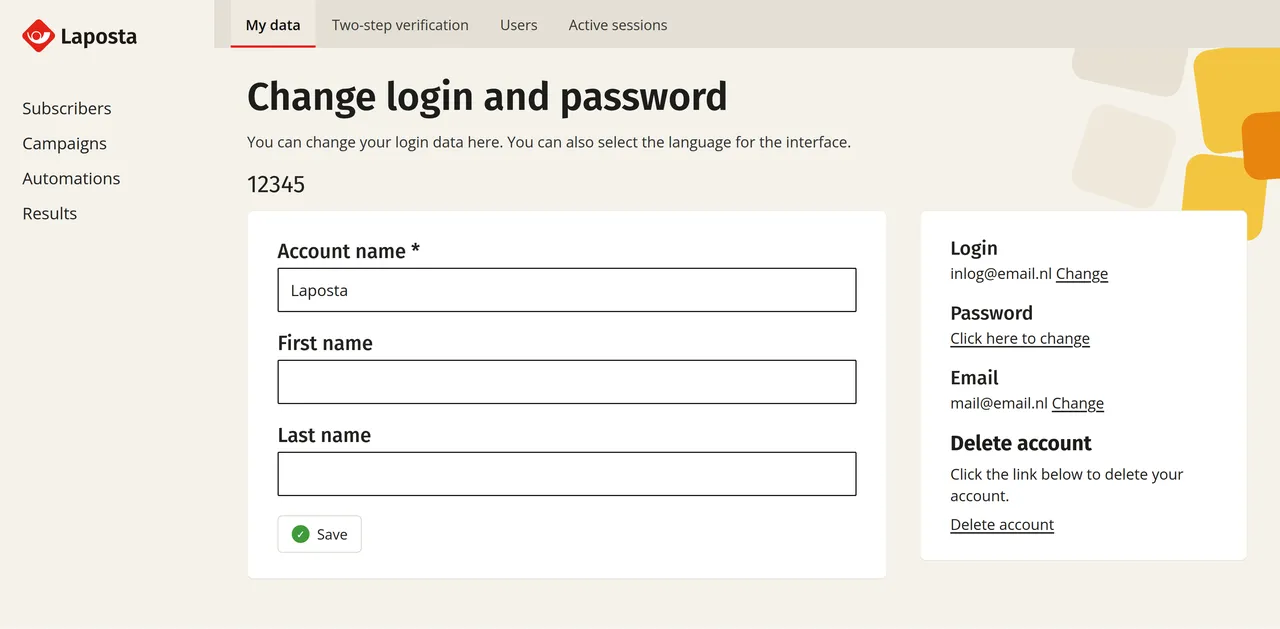
Editing your login and email address
In the box on the right, click ‘Change’ next to ‘Login’. Two rules apply to a login name:
- Your login consists of at least five and at most fifty characters. Besides letters and numbers, you can only use these characters: @ . - _
- Your login must be unique. A login name is often an email address, but it can also be another name or text. If someone else is already using that login name, you cannot choose it.
After saving, you will see a confirmation on the screen and receive an email with your new login at the email address of your account. The email address itself is a separate field. Laposta sends notifications to that address, for example to confirm details or to request a new password.
If you receive an email about a changed login without having changed anything yourself, please contact the helpdesk immediately via helpdesk@laposta.nl.
Retrieving your login
If you no longer remember your login, search your mailbox for messages from Laposta. Your login can be found in the email you received when your account was activated, and in every email sent after a subsequent change. If you work with multiple users or via a management environment, the administrator can look up your login for you.
Changing your password
In the box on the right, under ‘Password’, click ‘Click here to change’. You can read which requirements apply to the new password under the password requirements of Laposta. If you can no longer log in because you have lost your password, you can request a new password via the login page.
Managing permissions and other users
Under ‘My data’, you can only edit your own login. What a user is allowed to do within an account can be configured using roles and permissions. If you work with multiple accounts under a single umbrella, you can manage their logins in the management environment.