

What is a management environment for departments and brands?
Does your organisation send out different types of newsletters, for example for separate divisions, departments, brands or projects, and would you rather work in separate accounts than in a single account? If so, you can group those Laposta accounts under one umbrella: a management environment. This was previously called an overview account. Each division gets its own account containing only its own subscribers and campaigns, while you can manage everything from one central place.
What can you do in the management environment?
The starting point is the list of all your organisation’s accounts. Here you can see the usage and costs per account, such as the number of subscribers, how much has been sent and the invoice status. From this overview, you can directly open an account to manage it, for example to create users in it.
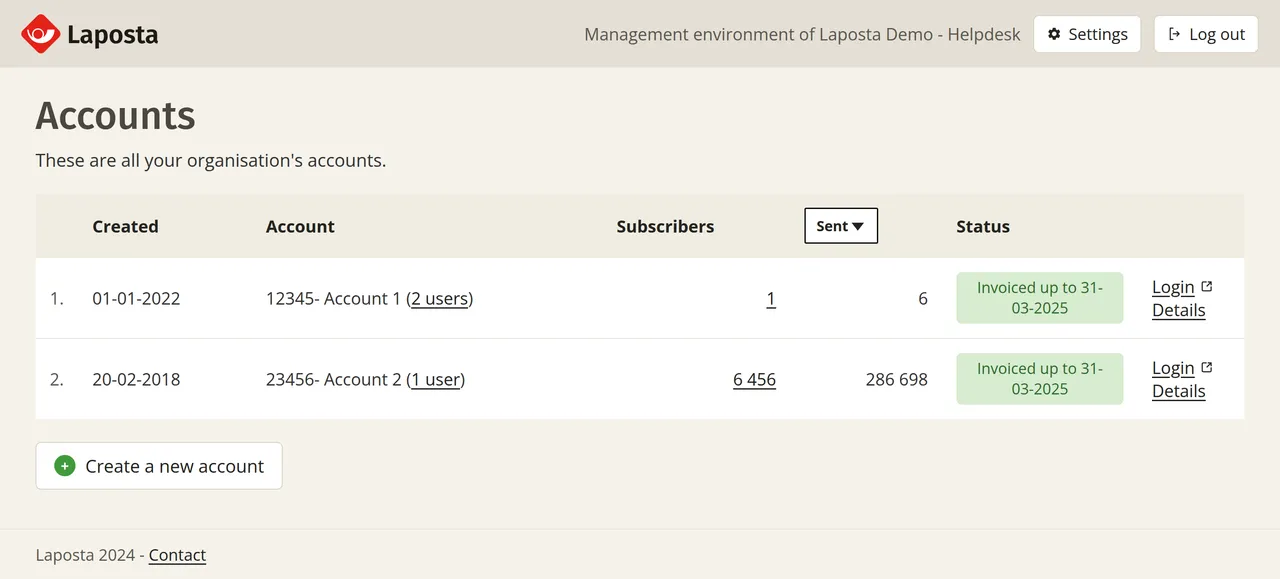
From this overview, you can also arrange the following:
- User management: manage the users of a single account, or of all accounts combined.
- Two-step verification: make two-step verification required for accounts.
- New accounts: you can create a new account yourself, with templates and other elements already set up and ready to use. For these new accounts, you can have default settings activated, such as a default sender address or template. Read how this works under creating a new account in a management environment.
- Invoicing: set up invoicing per account if desired.
User management at two levels
A management environment sits one level above the users within an account. It concerns the accounts themselves: which ones exist, who has access to them and what happens inside them. A login always belongs to one person. What that person is allowed to do depends on the level at which you grant access:
- Within an account, you decide who is allowed to work in that specific account and what they are allowed to do there. You arrange this in the account itself using permissions and roles.
- In the management environment, you can manage the users of all underlying accounts in one place and create extra logins for the management environment itself.
Anyone with access to the management environment automatically has access to all underlying accounts. If you want someone to only have access to a few accounts, you can give that user access to multiple accounts without granting access to the management environment.
Requesting a management environment
The management environment itself is free. You can read how the costs for the individual accounts work under costs of the management environment. If you are interested in this, send an email to verkoop@laposta.nl to request a management environment. If you already have a management environment, read how you can log in to the management environment.